

DRM-X 3.0 Security Settings
When you use DRM-X 3.0 platform, there's something to notice. To make protection safer, please select a series of necessary options to prevent piracy. It's very important to do these settings in the beginning.
We recommend Windows Business Account or above to protect files that for commercial sale.
For higher security level, please upgrade to DRM-X 4.0:
Haihaisoft redesigned security architecture for DRM-X 4.0 with higher security standards, the encryption method is completely different from DRM-X 3.0. With new Xvast Packager, the encryption is more complex and strict than before. Each file's encryption is different. It makes hacking protected files much harder. You can force customers using the latest version of Xvast browser. It also support safer license revoke. You can revoke the license delivered to users in DRM-X 4.0 account.
More Tutorials
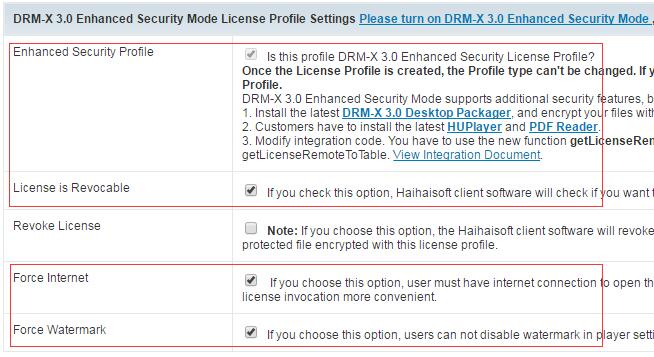
1. For License Profiles, please make sure that you choose Enhanced Security Profile option and License is revocable option.
If your users can always be online, please select Force Internet option. For protecting watermark, please select Force Watermark option.
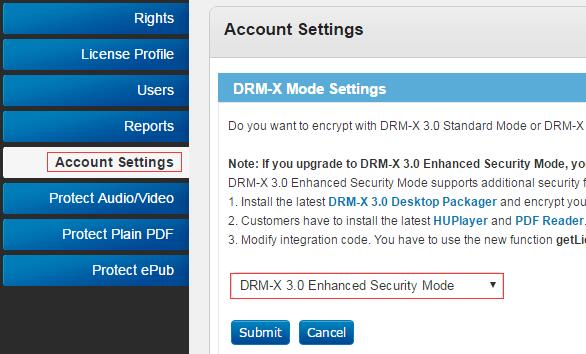
Please turn on DRM-X 3.0 Enhanced Security Mode: Account Settings->DRM-X Mode Settings
License Profile Settings:
2. For different files, you can use different license profiles to enhance security.
At least, using different license profiles to protect different kinds of contents. If you use the same License Profile to protect your files, they can be opened by the same license. If your need higher security level, we recommend that you encrypt each file with different license profiles. It's more secure, but your users have to acquire licenses for each file.
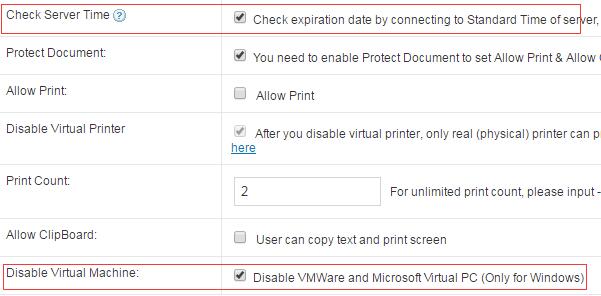
3. Basic Rights Settings: Please select Check Server Time option and Disable Virtual Machine option.
License Rights Settings:
4. Expiration Time options: Expiration Date option and Expiration after First Use option.
They shouldn't be more than half a year. Longer expiration date will cause trouble when you revoke License and reset Rights. Shorter expiration date is more secure.
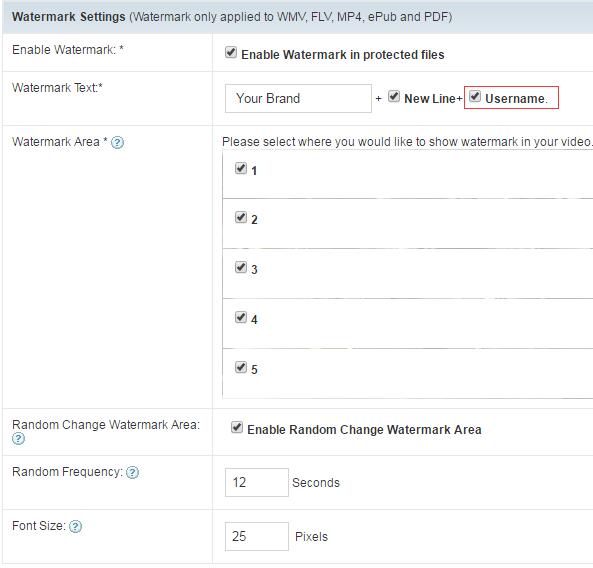
5. Watermark Settings. We highly recommend that you open Watermark.
Dynamic Watermark can show users' personal information. For example, user's mobile phone number, passport number, user id and so on. It's not for showing your company logo. Your company logo can be directly encode into videos. Dynamic Watermark can be used for Legal evidence purpose. People won't record the video when they see their mobile phone number or passport number showing on it. For watermark settings, please select Username. When you create user in DRM-X 3.0 Account, you can use user's mobile phone number as Username. You can also integrate with your web site and customize watermark text.
License Rights Settings:
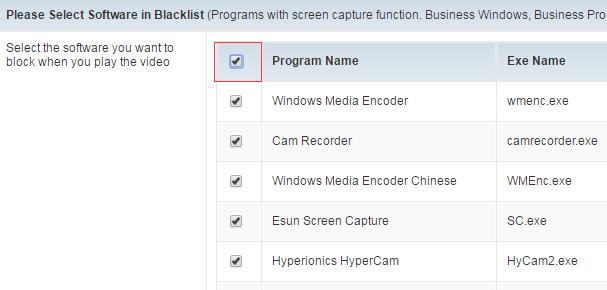
6. For Blacklist, please select all.
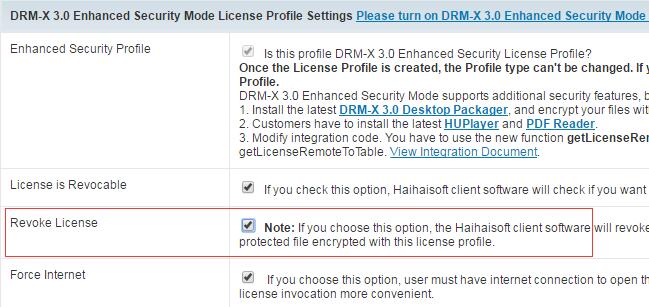
7. Revoke License.
If your contents are cracked, you can select Revoke License option in License Profile. It will revoke license when user open your content with Internet Connection. Then, you can force users upgrade to the latest client software and resend license. If you find someone records your video (by watermark text you can know which user) or someone asks for refund, you can revoke his license. You can also revoke someone's license in Users Revoke. Only Enterprise Account can use this function.
Revoke License:
8. PDF Document.
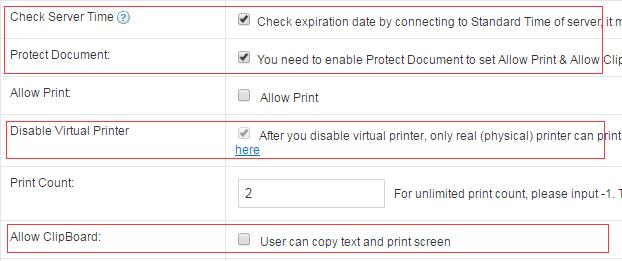
Please select Check Server Time option, Protect Document option and Disable Virtual Printer option. Please don't select Allow Clipboard option. If you allow your clients to print PDF, we highly recommend that you select Disable Virtual Machine option and set limited print count.
9. Force Use Latest Player (or Reader).
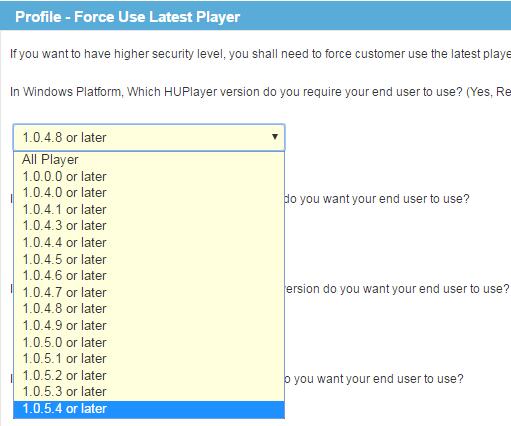
You can enhance security level by using the latest player or reader. If you don't know whether it's necessary to upgrade to the latest player or reader, you can contact with Haihaisoft Customer Service. You can set it on your DRM-X account: Account Settings -> Force Use Latest Player (or Reader).
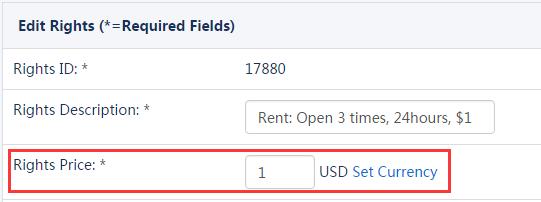
10. If you are haven't integrated DRM-X with your website, don't set the Rights price to 0.
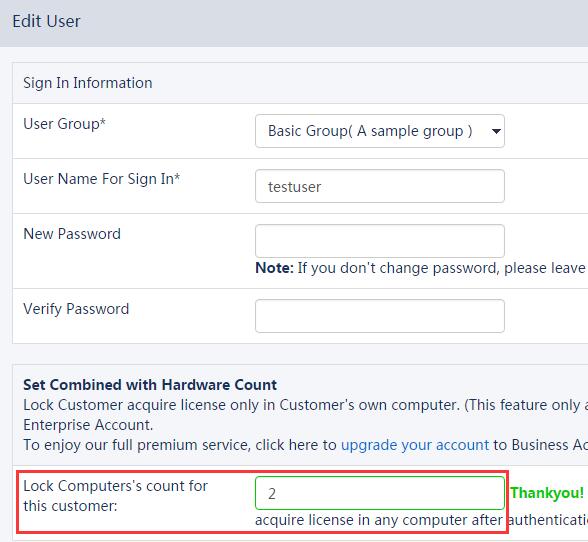
If you don't integrate with your website and use the standard DRM-X Admin. Don't set the Rights price to 0, it prevents users obtain license for an unlimited of times. We recommend that you set the number of hardware bindings for the end user. When hardware binding is enabled, the user can only obtain the license for the specified number of devices.
If you are have integrated DRM-X with your website, we recommended that you enable hardware binding for the end users so that security is optimal. If hardware binding is not enable, you must limit the number of times for user can acquire a license (through integration), which improves security.
Other DRM-X Tutorials
The Haihaisoft DRM-X XML web service provides the interface that content owners' website can deliver license to customers. For example, when a customer ordered a protected content from content owners' website, when customer plays the content, it will prompt content owners' website customized login page, after customer input Username and Password of content owners' websites account and done the payment, the customer will get the license immediately to play the protected file.
WATCH NOW/DRM-X3.0_Wordpress_Integrated_Demo(content_provider)_First_Frame.png)
Through this video, we will show you how to operate in the DRM-X management background after integrating DRM-X 3.0 with WordPress. You can create License Profile, relate it with courses, encrypt courses, add course products in the background of your own WordPress website and add video for courses.
WATCH NOW/DRM-X3.0_Wordpress_Integrated_Demo(endUser)_First_Frame.png)
Through this video, we will show how the end user can purchase the encrypted course and play the encrypted course after the integration of DRM-X 3.0 with WordPress.
WATCH NOW
You can easily integrate DRM-X platform with your own system by consuming Haihaisoft DRM-X 3.0 XML web service. The Haihaisoft DRM-X XML web service provides the interface that your website can deliver license to customers. Haihaisoft's development team has rich experiences in ASP, ASP.net, PHP, and JSP integration.
WATCH NOW
Through this video, we will show you how to use DRM-X 3.0 to encrypt video, how to set DRM-X 3.0 license rights, license profile, user group, user and others, how to encrypt audio and video files before encryption.And demonstrate how to open encrypted audio and video.
WATCH NOW
We will show you how to use DRM-X 3.0 to encrypt PDF documents, how to set DRM-X 3.0 license rights, license profile, user groups, users, and so on before encryption.And demonstrate how to open an encrypted PDF document.
WATCH NOWQuestions?
Our reps have answers.
Ask about Haihaisoft products, pricing, implementation, or anything else — our highly trained reps are standing by, ready to help.
Tel: +64 27 507 9959 (New Zealand)
QQ: 1279126286 / 994184623
Contact us on Microsoft Teams
service#haihaisoft.com (replace # into @)
Contact Us